
Zed Review 2026: Pricing, AI Agents, Pros and Cons
What the open source Zed editor costs with and without its hosted AI, how token billing adds up, and who should pay for Pro or Business.

Zed is worth it in 2026 if you want a fast native editor and prefer to pick your own AI, because the editor itself costs nothing. Personal is free forever, with unlimited use of your own API keys or external agents such as Claude Agent and Codex. Pro costs $10 a month and adds $5 of hosted tokens plus unlimited edit predictions, while Business costs $30 per seat a month, per Zed's pricing page on October 19, 2026. Hosted usage past the included credit is billed at the model provider's list price plus 10%. Toolradar data: the IDE and code editors ranking on Toolradar evaluated 130 tools as of October 2026, so a free editor is the norm; what Pro sells is hosted models and Zed's own edit predictions.
Key factsBest for: Developers who want a fast open source editor and bring…
- A native, multiplayer code editor with an Agent Panel, Zeta edit predictions and per-token hosted AI.
- Free plan: Personal costs nothing, with unlimited use of your own API keys and external agents
- Paid entry: Pro, the cheapest paid plan, adds hosted models and edit predictions
- Token markup: Hosted model usage is billed at the provider's list price plus 10%
- Alternatives covered: Cursor, GitHub Copilot, Claude Code, Visual Studio Code
Pros
- The Personal plan is free forever with unlimited own-key and external-agent use.
- A spend limit of $0 holds Pro to its flat fee, with hosted AI paused at the cap.
- Parallel agent threads can run in separate Git worktrees inside one window.
Cons
- Hosted tokens cost list price plus 10%, so Pro always costs more than your own key.
- Business has no SSO, SAML or SCIM yet and includes no token credit per seat.
- Zeta edit predictions require a paid plan or the trial; the free plan needs Copilot or a local model.
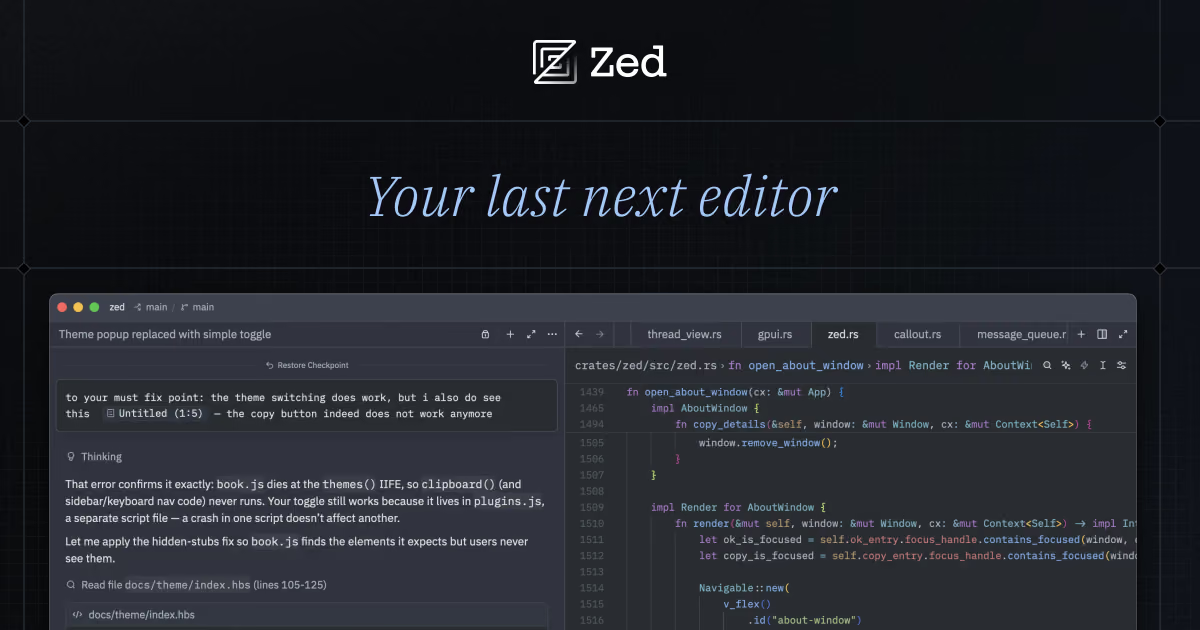
Zed is an open source code editor from the team behind Atom and Tree-sitter, and it now sells an AI layer on top. The pitch has two halves. The first is a native editor with multiplayer editing built in; the second is an Agent Panel that runs Zed's own agent or third-party agents side by side. The editor half is free, and the AI half is metered by the token. That makes Zed's bill very different from the flat AI subscriptions most rivals sell, and it rewards readers who know their own usage.
This review is for developers choosing between Zed and Cursor, VS Code with GitHub Copilot, or a terminal agent like Claude Code. It covers what Zed does, what each plan costs once tokens are counted, and where the 10% markup bites. It also shows when bringing your own API key is the cheaper route. Devshot runs no test lab, so every figure here comes from Zed's pricing page and documentation, not from a trial account.
What is Zed?
Zed calls itself the world's fastest IDE, open source, with AI optional. The source code is licensed mainly under GPL-3.0-or-later, with Apache-2.0 components where marked, per the Zed repository. It runs on macOS, Windows and Linux, and the editor needs no account: you sign in only for hosted AI and collaboration.
Three things set it apart from a VS Code fork. Collaboration is native, with channels, shared projects and voice chat in a Collaboration Panel, so two developers can edit the same files with live cursors. The Agent Panel hosts Zed's own agent plus external agents connected through the Agent Client Protocol, including Claude Agent, Codex, OpenCode, Copilot and Cursor's agent. And edit predictions come from Zeta, an open source model Zed develops, with GitHub Copilot, Codestral, Mercury Coder or a local model as alternatives.
Zed Industries also launched Delta in 2026, a separate multiplayer environment for coding with agents. It shares the Pro trial balance with Zed, but this review covers the editor.
How Zed works
Zed gives you three ways to pay for AI, and only one of them goes through Zed. Bring your own key: on any plan you can connect Anthropic, OpenAI, Google AI, Amazon Bedrock, Mistral, DeepSeek, OpenRouter, Ollama, LM Studio and other providers. The provider then bills you directly, at its own rates. External agents: Claude Agent, Codex and the other agents in the ACP Registry own their login and billing, and Zed charges nothing for them, per Zed's external agents docs. Zed-hosted models: on Pro, Student or Business you use Zed's hosted copies of Claude, GPT and Gemini models, billed per token at the provider's price plus 10%.
The first two routes mean an existing Claude or ChatGPT subscription works inside Zed at no added cost. Parallel Agents then lets you run several agent threads and terminal threads at once from a Threads Sidebar, each with its own context window and history. Threads can run in separate Git worktrees, so two agents can work on one repository without touching each other's files. Zed's own advice is to start a new thread for each task: every prompt, file and reply in a thread grows the context, and on hosted models that growth is the token bill.
Zed key features
Zed pricing
Zed's real price is the plan fee plus tokens, and the spend limit decides the ceiling. Pro's included token credit resets on your billing date. Past that, overage is charged at the end of the month or sooner as it builds up. The default spend limit lets extra tokens match the plan fee, so an untouched Pro account tops out at $20 a month, per Zed's plans and usage docs. Set the limit to zero and Pro costs exactly the plan fee, with hosted AI paused once the credit runs out.
Our arithmetic on a heavy month shows what the markup costs. Say one developer sends 10 million input tokens and 1 million output tokens to Claude Sonnet 5, ignoring cache discounts. At Zed's rates of $2.20 and $11 per million, listed on Zed's hosted models page, that is $33 of usage. The included credit absorbs part of it, leaving $28 of overage and a $38 month, which also needs a spend limit raised above the default. The same tokens on your own Anthropic key cost $8 less in total on the free Personal plan, since you pay only the provider prices Zed lists.
So Pro never wins on tokens alone. The fee buys only half its value in credit, and every hosted token carries 10% on top. At every volume we can compute, Pro costs more than the same usage on your own key. What the fee buys instead is Zeta edit predictions, which the Free plan does not include, plus one bill and higher rate limits on hosted models. Light users get the most from it: a cheap model like GPT-6 Luna at $0.11 per million input tokens stretches the included credit a long way.
Business and Student change the shape. Business seats include no token allotment, so a five-seat team pays $150 a month in seats on our arithmetic. Hosted usage comes on top at the same plus-10% rates, or runs through the team's own provider contracts. There is no minimum seat count and no free trial, order forms start at 25 seats, and SSO is not available yet (SAML and SCIM are planned). Verified university students get a free year with a monthly token credit, capped at that credit and without the Opus, Fable or GPT-6 Astra models.
Methodology: we read Zed's pricing page, its plans and usage docs and its hosted models page on October 19, 2026. Competitor prices come from Cursor's pricing page, GitHub Copilot plans and Claude's pricing page, read the same day. Totals and break-even points are our arithmetic on those list prices; nothing here comes from a benchmark or a usage test.
| Plan | Price | Best for |
|---|---|---|
| Personal | $0 forever | The full editor with unlimited use of your own API keys and external agents; no hosted models or Zeta predictions |
| Pro | $10/month | All hosted models, unlimited edit predictions, $5 of monthly token credit, then list price plus 10% |
| Pro trial | $0 for 14 days | A token credit equal to Pro's, usable on GPT-6 Luna only, plus unlimited edit predictions; no credit card, reverts to free |
| Student | $0 for one year | Verified university students; a monthly token credit twice Pro's, most hosted models, usage capped at the credit |
| Business | $30 per seat/month | Org-wide model policies, data governance, role-based access, one invoice; no included token credit |
Zed pros and cons
What we like
- The Personal plan is free forever with unlimited own-key and external-agent use.
- A spend limit of $0 holds Pro to its flat fee, with hosted AI paused at the cap.
- Parallel agent threads can run in separate Git worktrees inside one window.
What could be better
- Hosted tokens cost list price plus 10%, so Pro always costs more than your own key.
- Business has no SSO, SAML or SCIM yet and includes no token credit per seat.
- Zeta edit predictions require a paid plan or the trial; the free plan needs Copilot or a local model.
Who Zed is for
Zed fits a developer who already pays an AI provider and wants a faster editor to spend it in. With an Anthropic or OpenAI key, a Claude subscription or a Codex login, the free Personal plan gives you the editor, the Agent Panel and external agents at no extra cost. That combination is hard to match, because Cursor and Copilot both want a subscription before their agents do real work.
Pro makes sense for a light AI user who wants tab-style edit predictions and a hosted model without managing keys. Keep the spend limit at zero and the bill is fixed. A heavy agent user is better served elsewhere. The markup and the half-value credit make Pro the expensive way to buy a lot of tokens, while a flat plan such as Claude Code on Claude Pro caps the bill with usage limits instead.
Teams should read Business as an admin layer, not an AI bundle. It suits a company that wants to restrict which hosted models engineers use and lock data sharing, but a team that needs SSO today has to wait. Zed is also a weaker pick if your workflow depends on the VS Code extension catalog or on the deep language tooling JetBrains IDEs ship. Our best code editors roundup weighs those trade-offs.
Best Zed alternatives
If Zed is not the right fit, these are the closest options.
| Tool | Best for | Starts at | |
|---|---|---|---|
| Zed | Developers who want a fast open source editor and bring their own AI keys or agents. | Personal free | Visit → |
| Cursor | Developers who want an AI-first editor with cloud agents and bundled usage. | Free | Visit → |
| GitHub Copilot | Developers who want completions and agents inside VS Code, JetBrains or Zed itself. | Free tier | Visit → |
| Claude Code | Developers who want Anthropic's agent on a flat plan, in a terminal or inside Zed. | Included with Claude Pro at $20 monthly or $17 a month billed annually | Visit → |
| Visual Studio Code | Developers who need the largest extension catalog and a free editor. | Free for private and commercial use | Visit → |


The bottom line
Zed is worth it for most developers on the free plan: download it, connect the AI you already pay for, and judge the editor on its speed. Pay for Pro only if you want Zeta edit predictions or hosted models without keys, and set the spend limit before your first heavy agent session. Business is for teams that need model and data controls more than they need SSO today.
Skip Zed if you want one flat AI subscription with no token math, or if your work depends on VS Code extensions. For that route, compare the GitHub Copilot review, Cursor pricing and Claude Code pricing, or the full AI coding assistant pricing comparison. Free options sit in our best free AI coding tools list, and agents in best AI coding assistants. Directory records: Zed, Cursor, GitHub Copilot and VS Code on Toolradar.
Cite this: Devshot, 'Zed Review 2026: Pricing, AI Agents, Pros and Cons', November 2026.
Frequently asked questions
How much does Zed cost in 2026?
Is Zed free?
Is Zed Pro worth it compared with using my own API key?
How do I stop Zed Pro from charging more than the plan fee?
Is Zed better than Cursor?
Sources
Prices and plan details come from each vendor's own pricing page, re-checked by the Toolradar pricing tracker.
- Zed pricingchecked Sep 2026
- Cursor pricingchecked Sep 2026
- GitHub Copilot pricingchecked Sep 2026
- Claude Code pricingchecked Sep 2026
Some offers on this page may be paid placements or contain affiliate links.
Get the Devshot brief
Free daily newsletter, read in 5 minutes.
Subscribe free